
How to Use Google Flights (The Best Way)
Google Flights is one of the best tools for finding cheap flights, but most travelers only use a fraction of its features. If you know how to use Google Flights effectively, you can compare flexible dates, track airfare, search multiple airports, and make better booking decisions.
Instead of simply typing in a destination and clicking “Search,” you can use Google Flights to understand pricing trends, compare airports, discover cheaper travel dates, and even monitor airfare before booking.
Google Flights is excellent for cash airfare, but it’s only one of several tools for finding cheap flights and award travel. Here are the features that actually save travelers money.
Use Flexible Dates in Google Flights
One of the biggest mistakes travelers make is searching for only one departure date. Airfare can change dramatically from one day to the next depending on:
- Day of the week
- Seasonality
- Holidays
- Demand
- Airline schedules
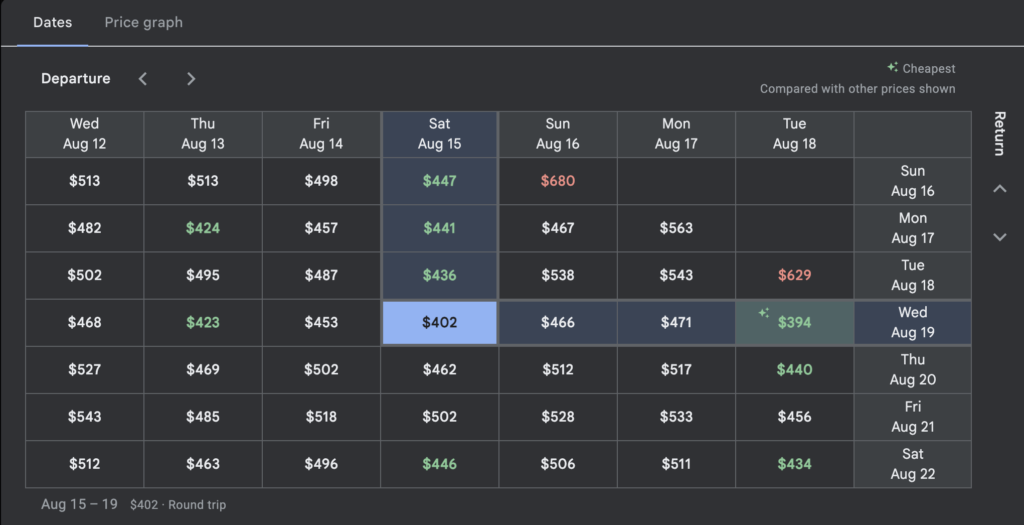
Google Flights’ Date Grid lets you compare prices across multiple departure and return dates in seconds, making it easy to spot the cheapest combinations.
Even shifting your trip by one or two days can sometimes save hundreds of dollars.
That’s because airlines don’t price flights based on distance, they price them based on expected demand. A Tuesday departure may simply be less popular than a Friday departure, allowing airlines to sell those seats at lower fares.
How to Use the Google Flights Price Graph
The Google Flights Price Graph is one of the platform’s most useful, and most overlooked features for finding cheaper airfare.
Instead of comparing just a handful of travel dates, the Price Graph lets you view flight prices across several weeks or even months, making it easier to spot the best time to book.
The graph quickly highlights:
- Expensive weekends
- Cheaper weekday departures
- Seasonal pricing trends
- Unusual fare spikes and drops
Rather than guessing whether today’s airfare is a good deal, you can compare your travel dates against nearby options and identify when prices are at their lowest.
If your travel dates are flexible, the Google Flights Price Graph can help you save hundreds of dollars simply by shifting your departure or return by a few days.

Compare Nearby Airports in Google Flights
Many metropolitan areas are served by multiple airports, and airfare can vary significantly between them.
Instead of searching only one airport, use Google Flights to compare nearby airports before you book. A short drive or train ride can sometimes save hundreds of dollars on the exact same trip.
Examples include:
- New York (JFK, Newark, LaGuardia)
- London (Heathrow, Gatwick, Stansted)
- Tokyo (Narita, Haneda)
- Washington, DC (DCA, IAD, BWI)
Before booking, always compare the total cost, including transportation to and from the airport, to determine which option offers the best overall value.
Turn On Price Tracking
If you don’t need to book immediately, turn on Google Flights Price Tracking.
Google continuously monitors your itinerary and emails you whenever the price changes, making it one of the easiest ways to watch airfare without repeatedly checking yourself.
Price Tracking removes much of the emotion from booking. Instead of wondering whether you should buy today or wait another week, you can let the market come to you and make a more informed decision when prices change.

Search an Entire Region
Not sure where you want to travel?
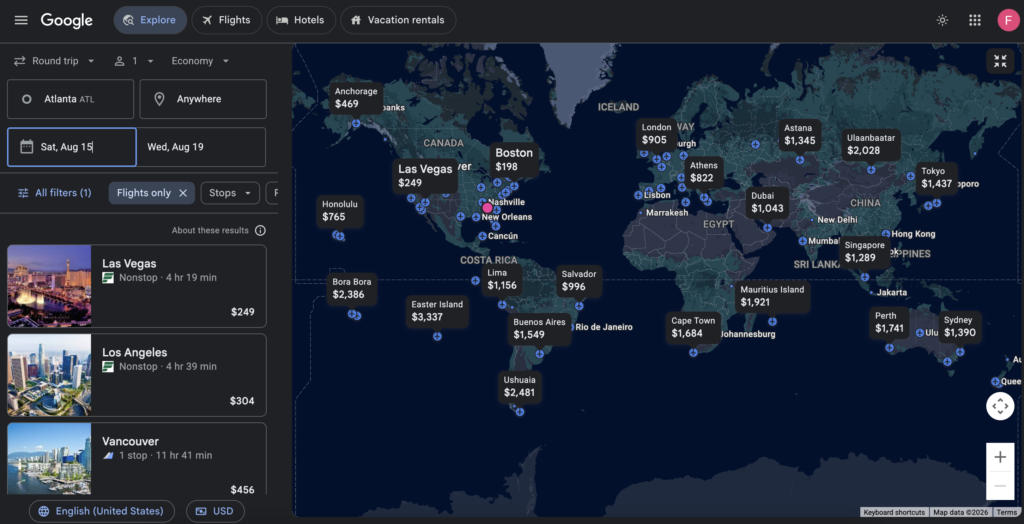
Instead of entering a destination, leave the destination field blank and use Google Flights Explore to browse airfare around the world.
The interactive map lets you compare flight prices across countries, regions, and cities, making it easy to discover destinations you may not have considered.
It’s especially useful for:
- planning vacations
- finding cheap flights anywhere
- booking award travel
- weekend getaways
- traveling during shoulder season
Rather than choosing a destination first, let the airfare guide your decision.
Sometimes your second-choice destination costs hundreds of dollars less, and delivers an equally memorable trip.
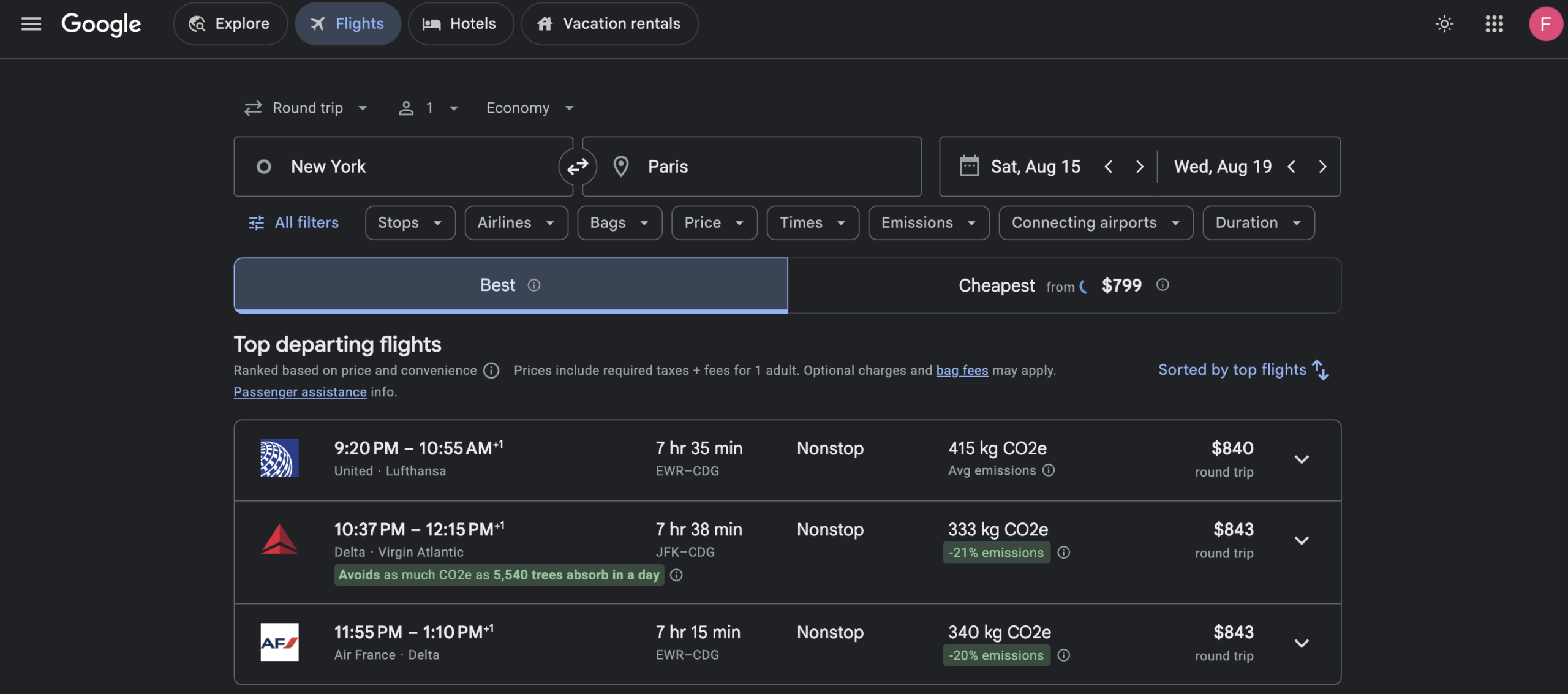
Use Filters Carefully
Filters generally help to narrow results, if you are looking for a specific customization to your itinerary including:
- nonstop only
- airline alliance
- baggage
- layover length
- departure times
But don’t filter too aggressively. Adding too many restrictions often removes the lowest fares. Sometimes accepting one short connection saves hundreds of dollars.
One of the key filters to use would be selecting layover length. Some airlines advertise the cheapest round-trip ticket, but when choosing a return flight, you are shocked to find out it is because the layover on the return segment is incredibly long.
Take the below image for example…there’s more value by paying the extra $200 vs. spending 13 hours when you’re on the way home.

Watch Google’s Pricing Insights
Google Flights provides pricing insights to help travelers determine whether a fare is low, typical, or high compared to historical prices for similar itineraries.
You may see messages such as:
- Prices are lower than usual
- Prices are typical
- Prices are higher than usual
These insights compare today’s airfare with historical pricing data for similar routes and travel dates. While Google’s fare predictions can be helpful, they’re not perfect. Think of them as another data point, not a guarantee that prices will rise or fall.
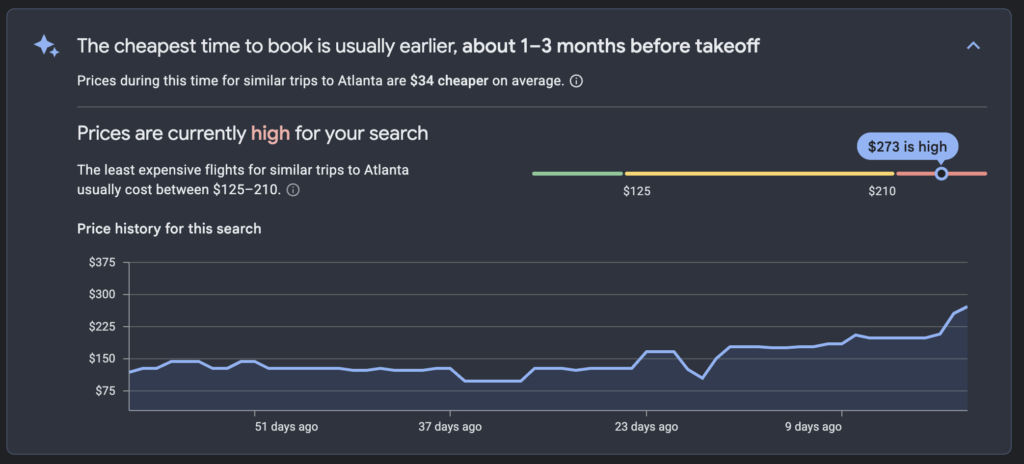
Used alongside Price Tracking, the Date Grid, and the Price Graph, Pricing Insights can help you decide whether it’s a good time to book your flight.
Understand What Google Flights Doesn’t Do
Google Flights is a flight search engine…not an airline.
It doesn’t set airfare prices or sell airline tickets. Instead, it searches fares published by airlines and online travel agencies, then directs you to the appropriate booking site.
It’s also important to know that Google Flights doesn’t include every airline.
For example, Southwest Airlines generally doesn’t publish its fares on Google Flights, so you’ll need to check Southwest’s website separately if it serves your route.
Understanding these limitations helps ensure you’re comparing as many options as possible before booking.
Don’t Wait Forever to Book
Many travelers spend weeks, or even months waiting for airfare to fall. Sometimes it does, but often it doesn’t.
If you’ve found a flight that fits both your budget and your travel plans, booking is usually a better strategy than trying to predict the absolute lowest price.
No one can consistently time the bottom of the airfare market.
Instead, use Google Flights’ Price Tracking, Pricing Insights, and historical fare data to make an informed decision, not a perfect one.
Remember:
The best airfare isn’t the cheapest fare that ever existed. It’s the best value available when you’re ready to book.
The Fare Theory
Google Flights is a search tool, not a pricing strategy. It helps you see the market, but understanding why airfare changes gives you an even greater advantage. The best travelers don’t just know how to search…they understand the economics behind airline pricing and make better decisions because of it.
The travelers who consistently find good airfare aren’t lucky, they use better data and understand how airline pricing works.
Google Flights helps you see the market.
Understanding airline economics helps you make better decisions within it.